Acer V3-571G FullHD IPS: Superb price/performance Linux development laptop

I recently needed a new mobile development workstation. My main requirements were that it should have at least a Full HD (1920×1080) IPS (in-plane switching) screen and a good keyboard, and that it should be able to run Linux, preferably Ubuntu, as its primary operating system.

After experimenting with a screenshot of my 1920×1080 desktop workstation running IntelliJ Idea 12 (my IDE of choice) on an Asus UX31A with 13″ Full HD IPS screen,  I realised that I would have to go with a larger screen. The Asus UX52VS with 15.6″ IPS also looked like a good bet, but there were no reviews available yet, it was not clear whether the 4GB RAM and hybrid HDD (large spindle drive, 24GB SSD cache) would be easily upgradable to full SSD, and the  €1200 price tag was reason for more consideration.
SSDs with usable built-in hardware-based full disk encryption

(tl;dr / post summary: Many current SSDs do super fast hardware AES encryption, but only a very few expose this correctly to the user, meaning you often still need a third-party software solution. Information on this is incredibly hard to find.)

Imagine that your laptop or your PC gets stolen. That would be terrible. However, it would be even worse if your laptop contained confidential data, either your own or that of your employer or client. It’s clear that encrypting one’s hard drive has become a necessity. There are good open source software solutions for this, for example TrueCrypt (Windows, Linux and OSX) and the LUKS/dm-crypt system. However, such software encryption systems require a small chunk of your CPU capacity, and also affect SSD performance and durability to a lesser or greater extent, depending on the controller.

Adding the ATA Security eXtension BIOS to AMIBIOS (Asus P5KC)

I’ve just purchased an Intel 520 SSD drive, which does hardware-based AES encryption of the whole disk, and is clever enough to encrypt the AES passphrase with the ATA / HDD password. This encryption implementation was my primary reason for getting this specific SSD. Many modern SSDs also employ hardware-based AES encryption for randomisation and for fast secure erase (they just reset the AES key!), but do NOT use the ATA password to encrypt the keys, so the encryption is far less effective at protecting your precious data. As far as my current information goes, the Intel 320, 520 and 710 drives do it correctly, as does the Samsung SSD 840 Pro and the Kingston SSDNow 200V+.

European Motorola Atrix 4G: Rooting, unlocking and CyanogenMod 7.2

The Motorola Atrix 4G, flagship phone about a year ago, is now a great budget option if you need an unlocked and high performance Android phone. An NVIDIA Tegra 2 dual-core 1 GHz processor, 1GB of RAM, 16GB of built-in storage, micro SD slot, front and back cameras, a 1950 mAh battery (!) and more can be had for an affordable € 260 here in the Netherlands.

Removing URLs from Zotero bibtex exports

When you export bibtex from zotero, it includes the URLs in the bibtex records. Some LaTeX bibliography styles include this information, and sometimes this is not what you want, for example because the URLs take up unnecessary space and are hard to wrap.

It’s quite easy to get zotero to export bibtex without the URLs.

  1. Go to Preferences | Advanced and click on the “Show Data Directory” button.
  2. Edit translators/BibTeX.js with your favourite text editor.
  3. In function doExport(), at around line 2040 in Zotero 3.0.7, change the “for (var field in fieldMap)” loop by adding a single line of code like this:
for(var field in fieldMap) {
    # only add the following line:
    if (field == "url") continue;
    if(item[fieldMap[field]]) {
        writeField(field, item[fieldMap[field]]);
    }
}

If your changes don’t seem to take, make sure that your text editor did not make a backup of the old BibTeX.js (vim does this, with an ~ appended), as Zotero could possible pick up the backed up version instead of your edited version.

Review of Ubuntu Linux 12.04 on the Samsung NP300V3A Core i5 NVIDIA Optimus laptop

An important warning: During installation, do NOT activate home folder encryption. Due to bugs 957843 and 509180, you will most probably suffer data loss, and you won’t even know about it until it’s too late. This happened on two of my laptops during normal use, both of which I have since completely reinstalled with LUKS whole disk encryption. It’s a shame that this bug has been known for years, but that Ubuntu still ships with this as its default home folder encryption configuration.

Fix for blurry photos on HTC Desire Z

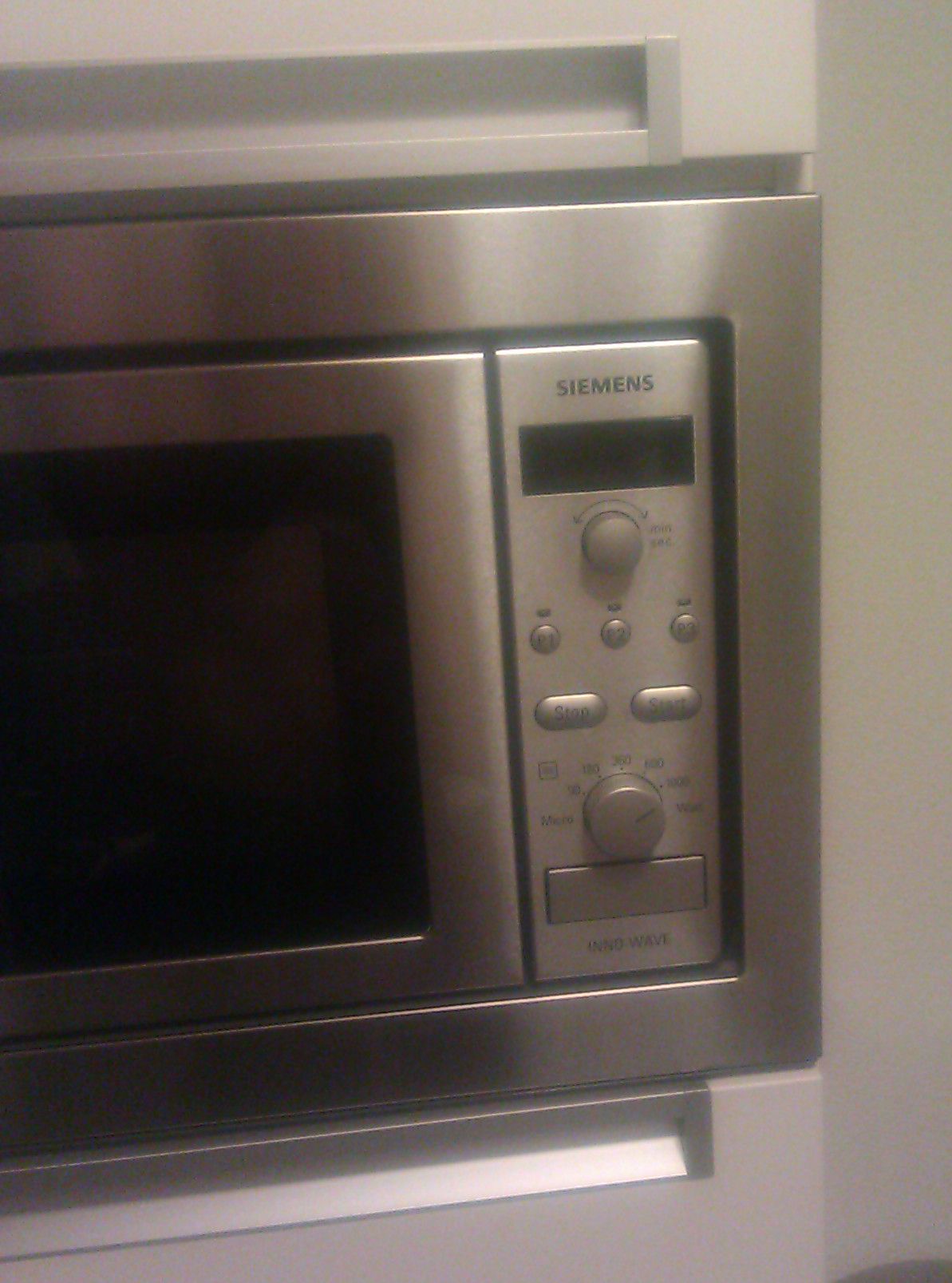
As you know, we here at VXLabs are of the educated opinion that the HTC Desire Z is an absolutely brilliant telephone. However, recently we noticed that some of our phones (at least two) started producing very blurry photos. See this test picture of my microwave for example:

Blurry-appearing microwave, in reality quite sharp!

This is of course quite irritating, especially in a phone that is otherwise sheer brilliance. No amount of moist-cloth lens cleaning could improve the results. Fortunately I came across this forum thread, where it was suggested either to replace the whole phone back plate including lens, or to have the phone repaired by the service centre, or to clean the lens with a q-tip and some toothpaste. The first two options either costing money or requiring a telephone still within its guarantee were quickly eliminated. Although the third option, suggested by forum user allanl-o, sounds strange, we wanted to explore it, for science’s sake of course. As an aside, the lenses of our two test telephones as well as that of the thread started looked like this (picture courtesy of xudsa II USERT, the thread started):

How to get Zotero IEEE style NOT to abbreviate with et al. in the bibliography

In my view, Zotero is currently the best reference manager available, and it’s also completely open source!

I had one niggling problem though with version 2.1.10 (latest stable at the time of this writing): When I would export (or Quick Copy) references in IEEE style, it would abbreviate the author list with “First Author, et al.” if there were seven (7) or more authors. When I’m building a bibliography list, this is of course never the right thing to do.

How to stop accidentally answering or declining calls when trying to fish your HTC Sense Android phone from your pocket

As you know by now, I really do love my HTC Desire Z phone. However, besides the miserable battery life which one tries to live with because it’s otherwise such a kickass phone, a major gripe was HTC Sense’s vertical swipe to answer or decline an incoming phone call. This has resulted in me accidentally answering or declining numerous incoming calls as I was trying to fish the phone out of my jeans pocket, as this fishing generally causes one’s fingers to slide vertically over the screen. The advice of turning the phone around so the screen faces one’s leg also doesn’t cut it, because the screen could get scratched on the various small studs one often finds in that area, but more importantly because I don’t like following semi-working rules like that.