
Fixing RoundCube Error in DDL upgrade

Just in case you run into the same problem I did when upgrading Roundcube from version 0.9.5 to 1.0.1, I’m posting the exact steps I took to fix the Error in DDL upgrade problem.

So, you’ve followed the Roundcube upgrade instructions, either using the installto.sh or the update.sh script, and then this happens:

Updating database schema (2013042700)... [OK]
Updating database schema (2013052500)... [FAILED]
ERROR: Error in DDL upgrade 2013052500: [1142] CREATE command denied to user 'roundcube'@'localhost' for table 'cache_shared'All done.

You search around and find this forum post by the author of iRedMail. However, if you’re like me, you need a little more detail to be able to apply his advice. Here’s how:
Configuring Emacs mu4e with nullmailer, offlineimap and multiple identities

mu4e is a mail user agent for your Emacs. After leaving GMail a few months ago, this is the first MUA that I am loving even more. The major reasons for this are the faster than GMail real-time search (e.g. press s, then from:buddy flag:attach design review and watch it search my 68 thousand email archive in a fraction of a second), its Emacs foundation (the more I use it, the better I get at customizing it) and the observation that having my email in an uncluttered, by default text-only interface, somehow helps me to maintain the feeling of control.

Modify Emacs Deft for recursive directory search

Update 2014-11-18 I’ve forked the original Deft, added this recursive directory listing feature as well as support for multiple different file extensions, and pushed it all to github as deft-turbo!

Deft is a neat Emacs mode for the Notational Velocity-inspired searching, browsing and editing of a directory of text files. In short, this means that simply start typing, and Deft finds the note that you were looking for. It supports straight text searching and regular expression searching, almost like my own baby nvpy.

Publish to WordPress with Emacs 24 and org2blog

I’ve recently discovered the absolute joy that is writing and publishing wordpress blog posts using Emacs 24 and org2blog. Because it took me a while to get everything (including source code syntax highlighting by the WordPress SyntaxHighlighter plugin) going, I wanted to document the whole procedure step-by-step, using org2blog of course!

I’m using Emacs 24.3 (from the PPA) with Prelude on Ubuntu 12.04.4.

Installing required packages

org-mode is already installed in Emacs 24 with Prelude. However, we need to install org2blog and some extra dependencies.

Syntax-highlighting markdown fenced code blocks in Emacs

The syntax-highlighted fenced code blocks in GitHub flavored markdown, or GFM, are a beautiful and useful invention. One starts a code block with three or more backticks or tildes, followed by the name of the language, and then proceeds to show one’s code, which, at least on GitHub, is then syntax highlighted.

In other words, something like this in your markdown:

```python
def computer_says(no):
    print("computer says %s" % (no,))
```

Would become this in the preview:

Export Zotero PDFs with BibTeX key filenames

This is just in from the department of silly Zotero hacks:

I’ve recently started using the brilliant papercite wordpress plugin to publish a list of my academic publications. This is awesome, because I can just export my Zotero bibliography as BibTex, and hand the bib file over to papercite!

However, when one exports a bibliography from Zotero, the associated PDF files are exported with their full filenames (whatever these may be), whilst papercite expects all PDFs to be in a single directory, each named bibtex_cite_key.pdf, for example malan_voxel_2013.pdf.

impress.js with embedded live webcam

impress.js is a great system for building Prezi-like non-linear presentations using HTML5, with the added benefit that it’s open source, and your infinite canvas is in 3D. See here for the original demo.

Recently I needed to give a presentation via Google Hangouts, and needed a good way to share both my impress.js presentation slides and the webcam feed of my scary talking face. Currently Google Hangouts does not support this out of the box. The solution of setting a separate webcam capturing application to “always-on-top” only works when the browser window, containing the presentation, is not set to full screen, so that won’t do.

d3 interpolators vs. ColorBrewer single hue sequential scales

Have you ever wondered to which extent you could emulate the beautiful ColorBrewer single hue sequential colour schemes with some form of linear interpolation between the endpoints? Wonder no more!

I made you a d3 example (see here for the gist) comparing the ColorBrewer sequential single hue schemes Blues, Greens, Oranges, Purples and Reds with the d3 L*a*b*, HCL, RGB and HSL interpolators. Click on the image to go to the bl.ock and see all of the colours.

Skype 4.2.0.11 on Linux: Premium subscription but NO group video and NO group screen sharing

Usually we use Google Hangouts for group video calling and also for screen sharing with more than two participants. If you’re not using Google Hangouts yet for your video conferences (full video and audio with more than two participants) and software demos, you really should. It’s a great product, it works on all platforms (Windows, Linux and Mac), and it’s free.

Skype for Linux 4.2.0.11 - even if you pay premium, you CAN'T group video call and you CAN'T group screen share

Skype for Linux 4.2.0.11 – even if you pay premium, you CAN’T group video call and you CAN’T group screen share

Samson C01U USB condenser microphone on Ubuntu Linux 12.04

I recently acquired the Samson C01U USB condenser microphone for better quality voice-overs on the sleep-inducing screencasts I sometimes make. It took some fiddling to get it setup correctly on Ubuntu 12.04 with the default ALSA drivers and PulseAudio sound system, so I’ve documented the steps here on the chance that it might help some other Ubuntu / Linux user.

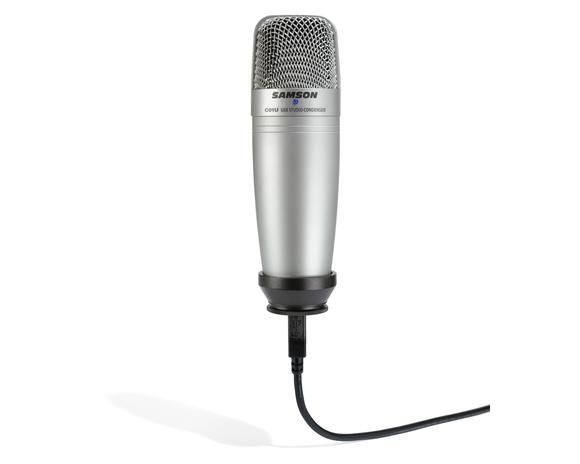
The microphone looks like this:

Samson C01U condenser USB microphone

Samson C01U condenser USB microphone